
Montco provides temporary network access for people that are not students, staff, or faculty. When you first connect, you will be required to authenticate. You will then be provided 24 hour access for the device.
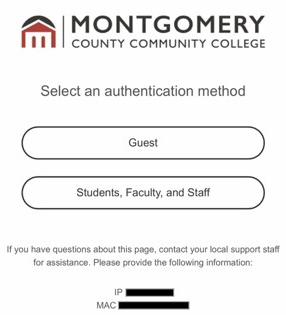
- Go to your device's network settings and select MC3Guest from the list of networks.
- Your browser should automatically bring you to a page where you can choose your authentication method. If not, open your browser and enter "wifi.mc3.edu" in your browser's search bar.
- Select Guest.
Note: If you are a student, staff, or faculty, you should connect to the MC3Secure wifi network. - Verify your device meets the standards checklist, and then select My dvice meets these standards.
- Select text or email for your verification method.
- Follow the prompts to complete verification.
- Enter the verification code that was sent to your phone number or open the link from
your email.
If you do not receive a text or email within 10 minutes, please contact the IT Service Desk via phone at 215-641-6495 and be ready to provide the MAC from the select an authentication method page in order to get connected.